Tuesday, December 4, 2012
id "hackers" are targeting common name Twitter accounts and reselling these accounts for a pretty penny. [Attention: The reporting below requires referencing profanities that may make readers uncomfortable.] In case you needed yet another example of why a simple password can come back to haunt you, a recently hacked Twitter account should have you heading over to your account settings. Daniel Dennis Jones, who had the Twitter handle @blanket, discovered that he was not able to access his account and realized that his password had been changed. After digging into the issue further, he found an alarming number of security flaws and lack of preventative measures on Twitter’s end. There’s a black market for Twitter handles, where commonly used names are being sold for less than $100 or simply being handed out to friends for what’s come to be known as the “lulz” — an Internet meme meaning “just for laughs.” Turns out, this is exactly what Jones fell victim to. Jones’ entry into the world of Twitter jacking began on Saturday when he was notified that his password had been changed. However, he was still logged into Twitter on his phone and eventually was able to gain access to his account via his email address only to realize that his user name was changed to the very NSFW handle @FuckMyAssHoleLO. Otherwise, nothing else on his account had been changed. After some digging, Jones had discovered an underground network of young kids who were jacking Twitter accounts with common (and short) names for pocket change. @blanket, he found was selling for only $60. Jones recounted his experience in Storify: “Twitternames that would have high value due to brevity: @hah, @captain, @craves, @abound, @grinding.” The medium for selling cracked passwords that @blanket and other hijacked accounts were being auctioned off was ironically through Twitter, and also a forum called ForumKorner. If you visit the forum, you’ll find anonymous individuals selling anything from jacked Minecraft accounts to Twitter usernames. So why is it so simple to crack Twitter passwords? First at fault might be the user. Simple passwords that can be found in the dictionary can be easily uncovered using the Brute Force Dictionary method. If you’re using a password like “Zebra” for example, it’s only a matter of time before the algorithm that rapidly inputs dictionary words to crack an account eventually enters the correct password, “Zebra.” But in Jones’ case, as he explained to Digital Trends, the password that he used was not as easy to crack as you might expect. His was a combination of a name and some numbers. More notable is the way that Twitter built its security and account input system makes it easy for anyone with the right program to hack the account. What Jones discovered was that Twitter seeks to prevent a large number of attempts that a single IP address attempts to access a Twitter account. It’s a weaker system that makes it susceptible and easier to hack. Most social networks will only offer a limited number of attempts to access the account itself. What this means is that simply by using multiple IP addresses, through a proxy for example, and an algorithm that changes the IP address (before the CAPTCHA pops up), you can attempt to breach an account for as many times as the number of IP addresses that you’re using. There’s an underground, albeit rudimentary, economy for stolen social accounts that may not be at the forefront of our minds like identity theft and the sales of social security IDs, but does in fact thrive. Jones was briefly immersed in the world when he went so far as to talk to a purported Twitter jacker, who was just 14 years old, and explained to Jones that Twitter was particularly easy to crack when compared to a site like YouTube. He also learned that some of these kids are contracting hackers to hijack specific accounts, whether to use for themselves or to “give to a girl,” which was the reason that @blanket was targeted. ”These kids decide they want a username and just sit there and wait for the jacker to get it for them,” Jones explained. ”One kid I saw on Twitter, said it took him 3 or 4 hours to crack a password for a username that he wanted.” If you’re using a vulnerable password, it’s really in your best interest to change it fast. If you happen to get your account stolen it’s unlikely that you’ll ever get it back, although Jones did get his account reinstated but only likely after publicizing his experience Read more: http://www.digitaltrends.com/social-media/blanket-has-twitter-account-stolen/#ixzz2E2UJ7PSQ Follow us: @digitaltrends on Twitter / digitaltrendsftw on Facebook

Audio jack hacking

Indian Security Research Atul Alex presented his surprise paper at the International Malware Conference, MalCon
on what can be termed as the onset of next generation of hardware
based malware that can target mobile devices irrespective of Platforms.
Typically, one of the largest challenges for malware coders are to
target multiple platforms. A malware for Android will not work in
Windows phone, Symbian or Apple iOS, which come in way of malware
coders. Also, devices such as iPhone are extremely secure and there is
little that can be extracted from a locked / secure iPhone, unless they
are jailbroken.
Atul Alex's research abuses voice
dialing feature which is enabled by default on all mobile platforms -
and combines a bugged headset with a micro controller and code to steal
private data. The bugged headset can also dial a pre-defined number by
detecting if the device is in use or not and turn the phone into a spy
device. Further, it can steal contacts from all devices - Blackberry,
iphone, Symbian, Windows and Android, without putting a malware inside
the mobile phone.


The bugged headset can in fact mimic voice commands and send it to the
device discretely - and Alex mentioned that advanced software like SIRI
can infact aid hackers in future in sending unauthorized text messages
as well as extract personal data and device information.
Any mobile device running Google Android, Microsoft Windows Phone, Apple
IOS 5, or Blackberry OS provides voice command capabilities. Some of
the other possible things include knowing call duration and even record
incoming and outgoing calls of users. And all this is possible just by
plugging a bugged headset into the Audio jack.
This has long term future implications and provides a grim future with
electronics warfare. Malwares can now target people across all
platforms, irrespective of 0-days in browsers, OS etc present or not..
and the last thing one would suspect is a gifted headset or speaker dock
for your device.
Monday, December 3, 2012
Popularity of Windows Server 2012 Soaring
Nine in ten IT professionals plan to deploy Windows Server 2012 within two years

Private cloud deployment, server virtualisation cited as major factors in Windows Server 2012 roll-out.
Around 90 per cent of IT decision makers are planning to deploy
Windows Server 2012 in the next 24 months, according to new research.
The study, carried out by analyst firm Enterprise Strategy Group, found that the two major reasons for deployment were server virtualisation and private cloud enablement.
Research showed that for respondents familiar with Windows Server 2012, 51 per cent found Server virtualisation to be a key product capability, while 49 per cent cited Private Cloud enablement as another.
The study, commissioned by Microsoft, questioned 440 IT decision makers around the world. The results showed that 42 per cent of those surveyed said they were delivering IT services to users in their organisation today via a private cloud. Another 32 per cent of respondents cited elasticity as an important attribute of private cloud infrastructure, while 26 per cent cited scalability.
The survey highlighted reasons why organisations were deploying Microsoft’s hypervisor, Hyper-V. Nearly 40 per cent cited operating systems upgrade, while economics was a popular reason (36 per cent). Product capabilities were mentioned by 35 per cent of respondents while another 34 per cent quotes skills alignment as a reason for deploying the hypervisor.
Edwin Yuen, director of strategy for Windows Server and Management at Microsoft said that server virtualisation and private cloud enablement were areas where Microsoft had made significant investments to ensure that Windows Server 2012 could address demanding IT needs, “such as scaling up your virtualisation and private cloud environments, while also providing you with licensing programs to help keep your costs down.”
Yuen added that the combination of these capabilities alongside the economical licensing model of Windows Server 2012 Datacenter meant that organisations could maximise hardware “without being penalised for doing so.”
“You can build out your virtualised environment today, while laying the ground work for your own private cloud,” said Yuen.
The study, carried out by analyst firm Enterprise Strategy Group, found that the two major reasons for deployment were server virtualisation and private cloud enablement.
Research showed that for respondents familiar with Windows Server 2012, 51 per cent found Server virtualisation to be a key product capability, while 49 per cent cited Private Cloud enablement as another.
The study, commissioned by Microsoft, questioned 440 IT decision makers around the world. The results showed that 42 per cent of those surveyed said they were delivering IT services to users in their organisation today via a private cloud. Another 32 per cent of respondents cited elasticity as an important attribute of private cloud infrastructure, while 26 per cent cited scalability.
The survey highlighted reasons why organisations were deploying Microsoft’s hypervisor, Hyper-V. Nearly 40 per cent cited operating systems upgrade, while economics was a popular reason (36 per cent). Product capabilities were mentioned by 35 per cent of respondents while another 34 per cent quotes skills alignment as a reason for deploying the hypervisor.
Edwin Yuen, director of strategy for Windows Server and Management at Microsoft said that server virtualisation and private cloud enablement were areas where Microsoft had made significant investments to ensure that Windows Server 2012 could address demanding IT needs, “such as scaling up your virtualisation and private cloud environments, while also providing you with licensing programs to help keep your costs down.”
Yuen added that the combination of these capabilities alongside the economical licensing model of Windows Server 2012 Datacenter meant that organisations could maximise hardware “without being penalised for doing so.”
“You can build out your virtualised environment today, while laying the ground work for your own private cloud,” said Yuen.
Firewall is Enabled and Configured on Windows Server 2008/R2 Domain Controllers
There have been a few changes in Windows Server 2008/R2 as to where
to find things. The Windows Firewall is no different. Here, I will show
you the best way to view the firewall settings, based on my experience.
In order to view the Windows Firewall, you will want to get into the Server Manager. Server Manager is one of the default Administrative Tools for all Windows Server 2008/R2 computers, including domain controllers. You will find the Server Manager fastest if you go to the Start button, then select Administrative Tools, then Server Manager. When Server Manager starts, it will look like Figure 1.

Figure 1: Server Manager for Windows Server 2008/R2.
Now that you are in Server Manager, you can find the Windows Firewall by opening the Configuration node, then selecting the Windows Firewall with Advanced Security node. After selecting these nodes, you should see a window similar to that in Figure 2.

Figure 2: Windows Firewall with Advanced Security interface.
For Windows Server 2008/R2 the inclusion of “with Advanced Security” is just this… the inclusion of IP Security with the Windows Firewall.
In addition to IP Security being integrated with the firewall, there is a new summary interface and wizard to help create your firewall rules. You can create Inbound rules, Outbound rules, and Connection Security rules. Inbound and outbound rules seem pretty obvious. Connection security rules are those rules that specify how and when authentication occurs. Connection security rules don’t allow or deny connections, that is, where you use inbound or outbound rules.
If we take a look at the firewall rules for a standard domain controller, we will see that there are firewall rules as follows:

Figure 3: List of default firewall rules for a Windows Server 2008/R2 domain controller.
To use the local configuration option, you will use the Server Manager interface that we discussed earlier on in this article. From the Windows Firewall with Advanced Security node within Server Manager, you can just right-click on the Inbound, Outbound, or Connection Security node and create a new rule. You will need to know what you want to control, as the wizard will not automatically generate rules. So, for example, you will need to know one or more of the following to create your rules: the program, port, allow or deny action, encryption requirements, and scope of the connection. You can see the wizard in Figure 4.

Figure 4: Windows Firewall rule wizard.
The other option, to use Group Policy, has a very similar wizard to that of the local option. The big difference is that Group Policy can have a single instance for the configuration, but that single instance can affect many computers. To access the Windows Firewall configuration within a Group Policy, you will need to first access the Group Policy Management Console (GPMC), which is one of the Administrative Tools. Once in the GPMC, you can use an existing Group Policy Object, or create a new one. I suggest you create a new GPO by right-clicking on the Group Policy Objects node and selecting New.
After creating your new GPO, you will edit it by right-clicking on it and selecting Edit. This will open up the GPO in the Group Policy Management Editor. From here, you will expand the following nodes to get to the Windows Firewall configuration: Computer Configuration\Policies\Windows Settings\Security Settings\Windows Firewall with Advanced Security, which can be seen in Figure 5.

Figure 5: Windows Firewall with Advanced Security in a GPO.
There is another Windows Firewall with Advanced Security node under the original one, but once you expand past this node, you will see the standard Inbound, Outbound, and Connection Security rules. Each of these has a wizard associated with it, just like the local version. Once these rules are established and saved in the GPO, you then only need to link the GPO to an Active Directory node, such as the domain or an Organizational Unit. (The Domain Admin will need to do this and should know the details on how the GPO application works.)
The Windows Firewall has been an under-utilized tool for many years. The interface has been unfriendly, the configurations confusing, and the overall capabilities less than impressive. Now, with the new integration of IP Security and the Windows Firewall, the capabilities and overall usefulness of the firewall in Windows Server 2008/R2 is not only a benefit, but a default, enabled service. The firewall for your Windows Server 2008/R2 domain controllers come with pre-defined rules, which control both inbound and outbound traffic. In the end, your Windows Server 2008/R2 domain controllers will be more secure from outbound attacks than with any other domain controller before.
thanks to windows security
http://www.windowsecurity.com/articles/Firewall-Enabled-Configured-Windows-Server-2008-R2-Domain-Controllers.html
In order to view the Windows Firewall, you will want to get into the Server Manager. Server Manager is one of the default Administrative Tools for all Windows Server 2008/R2 computers, including domain controllers. You will find the Server Manager fastest if you go to the Start button, then select Administrative Tools, then Server Manager. When Server Manager starts, it will look like Figure 1.
Figure 1: Server Manager for Windows Server 2008/R2.
Now that you are in Server Manager, you can find the Windows Firewall by opening the Configuration node, then selecting the Windows Firewall with Advanced Security node. After selecting these nodes, you should see a window similar to that in Figure 2.
Figure 2: Windows Firewall with Advanced Security interface.
How Windows Firewall is Better for Windows Server 2008/R2
One of the biggest changes that Microsoft has made to the Windows Firewall over the years is to integrate the firewall settings with IP Security settings. IP Security is one of the most powerful technologies that is around to help protect local computers. IP Security provides options for specifying which computers or networks can communicate with other computers or networks. The options are very granular and IP Security also includes the ability to encrypt the data communications.For Windows Server 2008/R2 the inclusion of “with Advanced Security” is just this… the inclusion of IP Security with the Windows Firewall.
In addition to IP Security being integrated with the firewall, there is a new summary interface and wizard to help create your firewall rules. You can create Inbound rules, Outbound rules, and Connection Security rules. Inbound and outbound rules seem pretty obvious. Connection security rules are those rules that specify how and when authentication occurs. Connection security rules don’t allow or deny connections, that is, where you use inbound or outbound rules.
Default Firewall Configuration
As was stated early in this article, Windows Server 2008/R2 domain controllers come with pre-configured firewall rules. Not only are there inbound rules, but there are outbound rules as well. This is a major step in the right direction with regard to protecting the computer by using the local firewall.If we take a look at the firewall rules for a standard domain controller, we will see that there are firewall rules as follows:
- Active Directory domain controller
- Core Networking
- DNS
- File and Printer Sharing
- File Replication
- Kerberos Key Distribution Center
- Remote Desktop
- Windows Management Instrumentation
Figure 3: List of default firewall rules for a Windows Server 2008/R2 domain controller.
Configuring Windows Firewall with Advanced Security
There are two options for configuring the Windows Firewall settings. Both have advantages, but as an auditor, you will appreciate one over the other. The first is to use the local computer configuration option, which means that each computer will need to be configured individually. The second is to use Group Policy, which allows for a single instance of configuration, which will then target many computers.To use the local configuration option, you will use the Server Manager interface that we discussed earlier on in this article. From the Windows Firewall with Advanced Security node within Server Manager, you can just right-click on the Inbound, Outbound, or Connection Security node and create a new rule. You will need to know what you want to control, as the wizard will not automatically generate rules. So, for example, you will need to know one or more of the following to create your rules: the program, port, allow or deny action, encryption requirements, and scope of the connection. You can see the wizard in Figure 4.
Figure 4: Windows Firewall rule wizard.
The other option, to use Group Policy, has a very similar wizard to that of the local option. The big difference is that Group Policy can have a single instance for the configuration, but that single instance can affect many computers. To access the Windows Firewall configuration within a Group Policy, you will need to first access the Group Policy Management Console (GPMC), which is one of the Administrative Tools. Once in the GPMC, you can use an existing Group Policy Object, or create a new one. I suggest you create a new GPO by right-clicking on the Group Policy Objects node and selecting New.
After creating your new GPO, you will edit it by right-clicking on it and selecting Edit. This will open up the GPO in the Group Policy Management Editor. From here, you will expand the following nodes to get to the Windows Firewall configuration: Computer Configuration\Policies\Windows Settings\Security Settings\Windows Firewall with Advanced Security, which can be seen in Figure 5.
Figure 5: Windows Firewall with Advanced Security in a GPO.
There is another Windows Firewall with Advanced Security node under the original one, but once you expand past this node, you will see the standard Inbound, Outbound, and Connection Security rules. Each of these has a wizard associated with it, just like the local version. Once these rules are established and saved in the GPO, you then only need to link the GPO to an Active Directory node, such as the domain or an Organizational Unit. (The Domain Admin will need to do this and should know the details on how the GPO application works.)
The Windows Firewall has been an under-utilized tool for many years. The interface has been unfriendly, the configurations confusing, and the overall capabilities less than impressive. Now, with the new integration of IP Security and the Windows Firewall, the capabilities and overall usefulness of the firewall in Windows Server 2008/R2 is not only a benefit, but a default, enabled service. The firewall for your Windows Server 2008/R2 domain controllers come with pre-defined rules, which control both inbound and outbound traffic. In the end, your Windows Server 2008/R2 domain controllers will be more secure from outbound attacks than with any other domain controller before.
thanks to windows security
http://www.windowsecurity.com/articles/Firewall-Enabled-Configured-Windows-Server-2008-R2-Domain-Controllers.html
Monday, November 26, 2012
Microsoft moves to relegate Windows 7 to second-class status
Microsoft moves to relegate Windows 7 to second-class status

As Microsoft goes full speed ahead on Windows 8, a number of signs suggest that Windows 7 is fading fast in Redmond’s rear view mirror.
On Monday, Microsoft program manager Daniel Moth confirmed in a support forum that DirectX 11.1 will only work with Windows 8. The company has “no plan” to bring DirectX to earlier versions of Windows—including Windows 7.
DirectX 11.1, Microsoft’s API for 3D graphics, isn’t a major update from DirectX 11, but it adds features to take advantage of high-end graphics processors. It also includes native support for Stereoscopic 3D. The news will mainly affect gamers who want to keepupgrading their rigs but would rather not move to Windows 8.
That’s not the only indication that Microsoft is starting to leave Windows 7 behind. Reportedly, Microsoft won’t release a second service pack for Windows 7, unnamed sources told The Register last month, and the company does not plan to offer an Xbox Music app for its older operating systems. For Windows Phone 8 users, Windows 8 has a slick modern-style app for syncing and viewing media, whereas Windows 7 only has a more bare-bones Windows Phone app for the desktop.
To be clear, Microsoft will support Windows 7 through 2015, meaning that it’ll offer both security and non-security updates for free. Extended support, which provides free security updates but requires a subscription for other hotfixes, will continue through 2020.
But when it comes to individual applications and services, Microsoft is starting to move on. Even Internet Explorer 10, which is already available on Windows 8, is only getting apreview version for Windows 7 this month, with no word on final availability.
It’s not unprecedented that Microsoft would start treating its older operating systems as second-class software. After all, Office 2013 won’t support Windows Vista or XP, and neither will Internet Explorer 10. Still, the Microsoft’s willingness to leave Windows 7 behind in some areas shows just how eager the company is to push Windows 8, lest we forgethow big of a bet this new operating system is for Microsoft.
Ransom ware
Imagine someone getting access to your computer, encrypting all your family photos and other priceless files, and then demanding a ransom for their safe return. That is what ransomware is all about. Online http://thehackernews.com/2012/11/latest-java-vulnerability-exploitation.html
Sunday, November 18, 2012
Learn to Create Websites at w3schools.com
 Excellent web based tutorial site for web development. It offers wide range of programming options for web designers..ranging from beginners to experts.
A glimpse
HTML / CSS
Learn HTMLLearn HTML5
Learn CSS
Learn CSS3
JavaScript
Learn JavaScriptLearn HTML DOM
Learn jQuery
Learn AJAX
Learn JSON
Learn Google Maps
Server Side
Learn PHPLearn SQL
Learn ASP
Learn ADO
Learn VBScript
ASP.NET
Learn ASP.NETLearn Web Pages
Learn Razor
Learn MVC
Learn Web Forms
Learn .NET Mobile
Friday, November 16, 2012
Online password can be hacked tooo....easily.
No matter how unique or complex your alphanumeric code is, hackers can always find a way in, warns Mat Honan in a new Wired cover story
"You have a secret that can ruin your life," cautions Mat Honan in the newest issue of Wired: Your password.
Why it's time to kill the online password
That little six- to 16-character alphanumeric string
controls your email, your bank account, and grants access to your
address, credit card number, and perhaps even naked pictures of
yourself. And no matter how complex or unique it is, your password
simply isn't good enough. Over the summer, hackers destroyed the entirety of Honan's online life in a mere hour,
cracking his Apple ID, Twitter account, Gmail password, and more. They
wiped out years and years worth of files on his iPhone, iPad, and
MacBook, and deleted every single picture he'd ever taken of his
18-month-old daughter. The problem with modern passwords, Honan says, is
they're simply too easy to crack. Hackers can use sophisticated new
programs to simply guess en masse, breaking into your accounts using
shear force. (The new cracking tools even have number substitutions
built in, meaning "p4ssw0rd" is just as bad as "password.") Honan's
suggestion? Something entirely new. Here, an excerpt:
The age of the password
has come to an end; we just haven’t realized it yet. And no one has
figured out what will take its place. What we can say for sure is this:
Access to our data can no longer hinge on secrets — a string of
characters, 10 strings of characters, the answers to 50 questions — that
only we’re supposed to know. The Internet doesn’t do secrets. Everyone
is a few clicks away from knowing everything.
Instead, our new system
will need to hinge on who we are and what we do: Where we go and when,
what we have with us, how we act when we’re there. And each vital
account will need to cue off many such pieces of information — not just
two, and definitely not just one.
This last point is
crucial. It’s what’s so brilliant about Google’s two-factor
authentication, but the company simply hasn’t pushed the insight far
enough. Two factors should be a bare minimum. Think about it: When you
see a man on the street and think it might be your friend, you don’t ask
for his ID. Instead, you look at a combination of signals. He has a new
haircut, but does that look like his jacket? Does his voice sound the
same? Is he in a place he’s likely to be? If many points don’t match,
you wouldn’t believe his ID; even if the photo seemed right, you’d just
assume it had been faked.
And that, in essence, will be the future of online identity verification.
Android phones having zero day vulnerabilities
The
Samsung Galaxy S3 can be hacked via NFC, allowing attackers to download
all data from the Android smartphone, security researchers demonstrated
during the Mobile Pwn2Own contest in Amsterdam.
Using a pair of zero day vulnerabilities, a team of security researchers
from U.K.-based MWR Labs hacked into a Samsung Galaxy S3 phone running
Android 4.0.4 by beaming an exploit via NFC (Near Field Communications).

NFC is a technology that allows
data to be sent over very short distances. For mobile devices, the
protocol allows digital wallet applications to transfer money to pay at
the register. While the technology has been slow to take off, despite
the adoption by Google for its Wallet payment application, a number of
recent high-profile announcements have boosted its adoption.
"Through NFC it was possible
to upload a malicious file to the device, which allowed us to gain code
execution on the device and subsequently get full control over the
device using a second vulnerability for privilege escalation," MWR InfoSecurity said in a statement. "The same vulnerability could also be exploited through other attack vectors, such as malicious websites or e-mail attachments."

The attacker, for instance, gets
access to all SMS messages, pictures, emails, contact information and
much more. The payload is very advanced, so attackers can "basically do
anything on that phone," the researchers said.
How this Works:
1.) The
first, a memory corruption flaw, was exploited via NFC (by holding two
Galaxy S 3s next to each other) to upload a malicious file, which in
turn allowed the team to gain code execution on the device.
2.) The
malware then exploited a second vulnerability to gain full control over
the device using privilege escalation. This undermined Android’s app
sandbox model, allowing the attackers to install their customised
version of Mercury, the company’s Android assessment framework.
3.) Mercury
was then used to exfiltrate user data on the device (such as contacts,
emails, text messages, and pictures) to a remote listener.
Researchers also said that,"Crucially,
the ASLR implementation is incomplete in Android 4.0.4, and does not
cover Bionic (Android’s linker) and /system/bin/app_process, which is
responsible for starting applications on the device. Other protections
which would make exploitation harder were also found to be absent."
MWR Labs, which won $30,000 for
its hack, is planning a more technical blog post detailing the process
of finding and exploiting this bug.
Also, a Dutch research Joost Pol
, CEO of Certified Secure, a nine-person research outfit based in The
Hague hack into Apple's iPhone 4S from scratch, exploited a WebKit
vulnerability to launch a drive-by download when the target device
simply surfs to a booby-trapped web site.
They used code auditing
techniques to ferret out the WebKit bug and then spent most of the three
weeks chaining multiple clever techniques to get a "clean, working
exploit."
During the Pwn2Own attack, Pol
created a web site that included an amusing animation of the Certified
Secure logo taking a bite of the Apple logo. The drive-by download
attack did not crash the browser so the user was oblivious to the data
being uploaded to the attacker's remote server. "If this is an
attack in the wild, they could embed the exploit into an ad on a big
advertising network and cause some major damage."
The duo destroyed the exploit immediately after the Pwn2Own hack. "We shredded it from our machine. The story ends here, we're not going to use this again. It's time to look for a new challenge,"
Pol said.He provided the vulnerability and proof-of-concept code that
demonstrates the risk to contest organizers at HP TippingPoint Zero Day
Initiative (ZDI).
http://thehackernews.com/2012/09/android-404-multiple-zero-day.html
Sunday, November 11, 2012
XSS MAKES ALL FINANCIAL TRANSACTIONS VULNERABLE
Cross Site Scripting (XSS) is currently the most common vulnerability in the world. This is vulnerability of some host which allows anyone to inject code/scripts into the page. The injected scripts could be html tags, javascript script, vbscript scripts.
A Hacker with virtual name 'Human mind cracker' expose similar vulnerabilities in some big and Important sites, like Israel airline, Myspace, MTV website, Sweden government, Bangladesh bank, Nasa subdomain, Brown University, Afghanistan government website and Rome government website.
In a pastebin note, hacker disclose the vulnerabilities and exact working links. These Cross Site Scripting existence is because of the lack of filtering engines to user inputs at websites, forms and web servers.
Most of the time readers thinks that XSS is a very minor bug and having very less impact. But if implemented in a better way, that can harm all the visitors who will visit infected site.

We know that XSS combined with Social Engineering always perform best for an attacker. Technology is changing, and hacker attacks are getting more sophisticated but with our aim we are keep on trying educate maximum number of people viaThe Hacker News. Be in touch, Be regular, Be Safe !
Tuesday, October 23, 2012
Beware of Mobile Charging Points at Public Places..like Airport
Beware of Juice-Jacking
You’re out and about, and your smartphone’s battery is about to die. Maybe you’re at an airport, hotel, or shopping mall. You don’t have the power cable needed to charge the device, but you do have a USB cord that can supply the needed juice. Then you spot an oasis: A free charging kiosk. Do you hesitate before connecting your phone to this unknown device that could be configured to read most of the data on your phone, and perhaps even upload malware?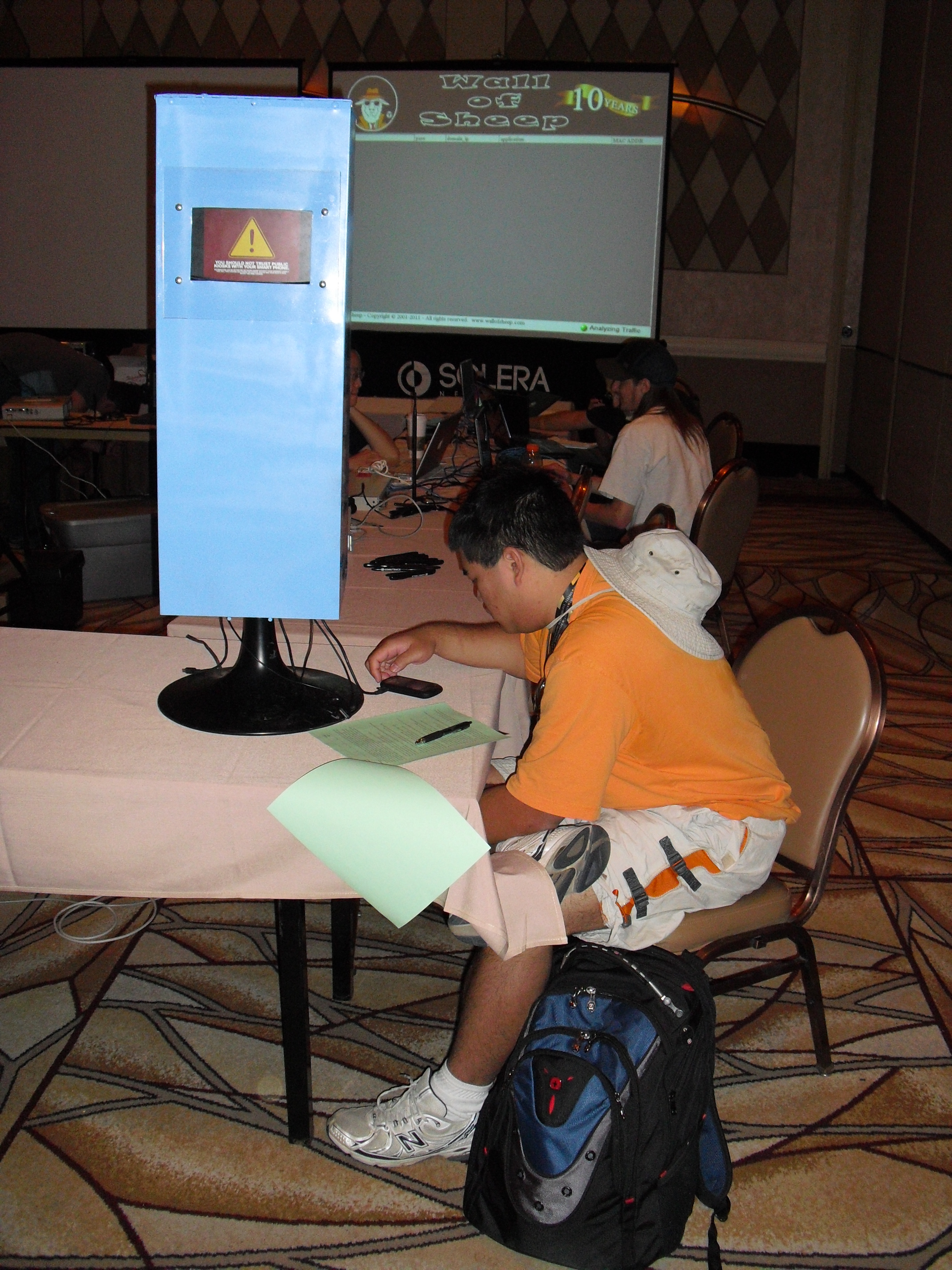
A DefCon attendee using the charging kiosk.
Granted, a charging kiosk at an airport may be less suspect than, say, a slightly sketchy-looking tower of power stationed at DefCon, a massive hacker conference held each year in Las Vegas. At a conference where attendees are warned to stay off the wireless networks and avoid using the local ATMs, one might expect that security experts and enthusiasts would avoid using random power stations.
But some people will brave nearly any risk to power up their mobiles. In the three and a half days of this year’s DefCon, at least 360 attendees plugged their smartphones into the charging kiosk built by the same guys who run the infamous Wall of Sheep, a public shaming exercise at DefCon aimed at educating people about the dangers of sending email and other online communications over open wireless networks.
 Brian Markus, president of Aires Security, said he and fellow researchers Joseph Mlodzianowski and Robert Rowley
built the charging kiosk to educate attendees about the potential
perils of juicing up at random power stations. Markus explains the
motivation behind the experiment:
Brian Markus, president of Aires Security, said he and fellow researchers Joseph Mlodzianowski and Robert Rowley
built the charging kiosk to educate attendees about the potential
perils of juicing up at random power stations. Markus explains the
motivation behind the experiment:“We’d been talking about how dangerous these charging stations could be. Most smartphones are configured to just connect and dump off data,” Markus said. “Anyone who had an inclination to could put a system inside of one of these kiosks that when someone connects their phone can suck down all of the photos and data, or write malware to the device.”
To make their charging station more attractive to passersby, Markus and his pals equipped it with a variety of charging cables to fit the most popular wireless devices. When no device was connected, the LCD screen fitted into the charging station displayed a blue image with the words “Free Cell Phone Charging Kiosk.” The screen switched to a red warning sign when users plugged in any devices. The warning message read:
“You should not trust public kiosks with your smart phone. Information can be retrieved or downloaded without your consent. Luckily for you, this station has taken the ethical route and your data is safe. Enjoy the free charge!”Markus said the comments from those who chose to juice up their phones at the kiosk were the most rewarding part of the project.
 “One
guy that clearly seemed stressed and in a hurry to get his phone topped
off said, ‘I don’t care, take my data, I need my phone charged to make a
phone call!’” Others said they planned to wipe their phones after
leaving the hacker conference anyway.
“One
guy that clearly seemed stressed and in a hurry to get his phone topped
off said, ‘I don’t care, take my data, I need my phone charged to make a
phone call!’” Others said they planned to wipe their phones after
leaving the hacker conference anyway.“One attendee claimed his phone had USB transfer off and he would be fine. When he plugged in, it instantly went into USB transfer mode,” Markus recalls. “He then sheepishly said, ‘Guess that setting doesn’t work.’”
Another DefCon attendee remarked, “This freaked my boss out so much he sent an email across the entire company stating employees are now required to bring power cables and/or extra batteries on travel, and no longer allowed to use charging kiosks for smart devices in open public areas.”
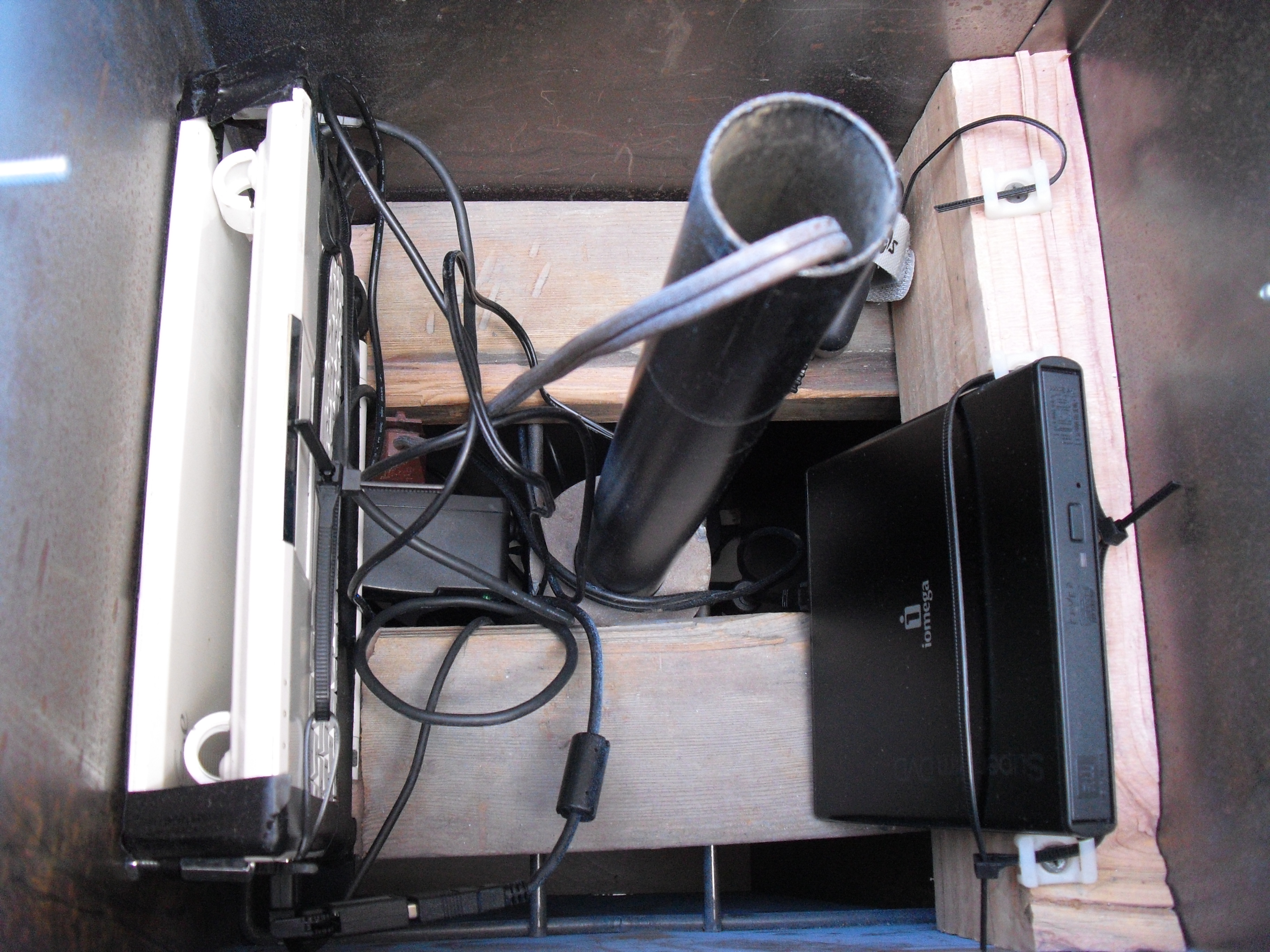
Inside the charging kiosk.
“One thing we discovered: On certain devices, if you power them completely off, then charge them, they don’t expose the data,” Markus said.
Thursday, October 18, 2012
Simple steps to Create Your own web page and publish it.
couple of my friends have asked for guidance on how to create own web pge. here is one link, i hope would be useful.
http://websitesetupguide.com/
http://websitesetupguide.com/
Tuesday, October 16, 2012
Word Press Accounts Hacked For Making Money

Wordpress Security Team is sending out warning messages to thousands of wordpress users that their account has been compromised recently. Warning message include "We recently detected suspicious activity on your WordPress.com account. To protect your identity and keep your site safe, we’ve reset your password."


Message continue "To reset your password and get access to your account and blog, please visit WordPress.com. Click on “Forgot password?” in the Login toolbar to get started. It is very important that your password be unique because using the same password across different web applications increases the risk of your account being hacked."
Few hours ago I got mail from one of the 'The Hacker News' Reader that his wordpress blog (https://h4ck3r4life.wordpress.com/) has been compromised and he got same wordpress warning via email .When he login to his account, he saw that - Hacker post an article, title - "Im getting paid!" with an Image as article body shown below. Image hyperlink it to a survey site - http://surveyryphic.com/?=38823. This was a *.wordpress.com free blog.

On further search I found that, its not only his blog that has been compromised but also there are other 15000 more Wordpress users who have seen this spam article i.e "Im getting paid!" on their blogs. I just use google to find out the number of compromised blog, using dork -- site:wordpress.com "Im getting paid!" , and we got around a list of 15000 and more blogs that have same article with same image and Referal link to fake survey site.

I have also mark the day of post in above screenshot, its "1 DAY AGO" from writing of this article by me. Next, if we go to survey site, there is a signup page, if you want to become rich :P (obviously a greedy strategy to attract visitors).

But I ignore and sign up using my own email and website moved to another domainhttp://directredirection.be/thankyou3.html. Just after signup I got a mail from spammers that - "You're invited to participate." with option to click on "Claim My Spot", and I found Cybercriminals are using Bulk email campaign service form Getresponse.com, which is one of the biggest Email Marketing service. I contact Getresponse response team and still waiting for their reply about help to track down hackers.
Okay back, after clicking "Claim my Spot" from email I moved to another phishy site http://ecash0pinions.com/main.php?hop=ryph1, who are offering lots of Earn Extra Income From Home. There greedy strategy tagline is "Earn money by uploading videos".
So, in whole process this referral spam, that started from hacking of 15000 Wordpress blogs, we got three suspicious domains:
1.) http://surveyryphic.com
2.) http://directredirection.be
3.) http://ecash0pinions.com
After gathering more information, we found that :
1.) First to domains are Hosted same IP i.e 91.217.178.43 and 3rd one if on different 108.179.210.36
2.) "Rick Thomas" is the person who run "ecash0pinions.com" website, having Personal email:rickthomasvendor@gmail.com and Skype username: rickthomas.vendor.
3.) Another marketing sites by Rick is extremewealthmechanism.com.
4.) Most of his domains are Hosted on Russian hosting services.
May be Rick is not involved in these hacks, but possibly someone else using his referral system service to generate lots of money by directing thousands sites and readers via his referral link to such marketing sites.
Sour ce: www.thehackersnews.com
Sour ce: www.thehackersnews.com
IE Zero Day Triggers Malware automatically
New Internet Explorer zero-day, Can trigger malware automatically

The new zero day exploit has been discovered and being exploited in the wild. This can be used to load malicious application on victim machines running fully patched Windows XP SP3 along with the latest editions of the IE 7 and IE 8 browser and Adobe's Flash software.
Eric Romang was examining one of the servers used to launch attacks on vulnerable Java installations in past, and he says that he has found a new zero day exploit for Microsoft's Internet Explorer web browser. He said, "I can confirm, the zero-day season is really not over yet."
AlienVault Labs researcher Jaime Blasco reported that, "the gang behind the Java attacks in August and September may be moving on: with domains used in that attack located at new IP addresses and serving up the new and more potent attacks."
As shown in above image example, the file exploit.html creates the initial vector to exploit the vulnerability and loads the flash file Moh2010.swf, which is a flash file encrypted using DoSWF. The Flash file is in charge of doing the heap spray. Then it loads Protect.html.
There results also shows that this zero day attack is being used in attacks that install the Poison Ivy Trojan. Metasploit has released a working exploit for this Zero-day.
Source: www.thehackersnews.com
Sunday, October 14, 2012
Make Your Own Website using word press
Making a web page is not a rocket science. Anyone with a little-bit knowledge of computers and soft wares can easily make an excellent web page. Please check this excellent video.
http://www.youtube.com/watch?feature=player_detailpage&v=ScsOlOJsLZ4#t=0s
http://www.youtube.com/watch?feature=player_detailpage&v=ScsOlOJsLZ4#t=0s
Thursday, October 11, 2012
installing dhcp server:THANKS TO YOYO CLOUDS.COM
Installing and configuring DHCP Server on Windows 2008 R2
Introduction
Dynamic Host Configuration Protocol (DHCP) is a
core infrastructure service on any network that provides IP addressing
and DNS server information to PC clients and any other device. DHCP is
used so that you do not have to statically assign IP addresses to every
device on your network and manage the issues that static IP addressing
can create. More and more, DHCP is being expanded to fit into new
network services like the Windows Health Service and Network Access
Protection (NAP).
However, before you can use it for more advanced
services, you need to first install it and configure the basics. Let’s
learn how to do that.
Installing Windows Server 2008 DHCP Server
Installing Windows
Server 2008 DCHP Server is easy. DHCP Server is now a “role” of Windows
Server 2008 – not a windows component as it was in the past.
To do this, you will need a Windows Server 2008 system already
installed and configured with a static IP address. You will need to know
your network’s IP address range, the range of IP addresses you will
want to hand out to your PC clients, your DNS server IP addresses, and
your default gateway. Additionally, you will want to have a plan for all
subnets involved, what scopes you will want to define, and what
exclusions you will want to create.
IMP NOTE:
DHCP Server will require you to already have a AD and a DNS in place.
You can read the How-TO article on each by clicking on the links below:
To start the DHCP installation process, you can click Add Roles from the Initial Configuration Tasks window or from Server Manager >> Roles >> Add Roles.

When the Add Roles Wizard comes up, you can click Next on that screen.
Next, select that you want to add the DHCP Server Role, and click Next.

Review the DHCP Serer requirements and click Next to proceed

NOTE: If you do not have a static IP address assigned on your server, you
will get a warning that you should not install DHCP with a dynamic IP
address.
At this point, you will begin being prompted for IP network
information, scope information, and DNS information. If you only want to
install DHCP server with no configured scopes or settings, you can just
click Next through these questions and proceed with the installation.
On the other hand, you can optionally configure your DHCP Server during this part of the installation.
In my case, I chose to take this opportunity to configure some basic IP settings and configure my first DHCP Scope.
I was shown my network connection binding and asked to verify it, like this:

What the wizard is asking is, “what interface do you want to provide DHCP services on?” I took the default and clicked Next.
Next, I entered my Parent Domain, Primary DNS Server, and Alternate DNS Server (as you see below) and clicked Next.

I opted NOT to use WINS on my network and I clicked Next.
NOTE: The Windows Internet Name Service (WINS) enables machines to resolve
NetBIOS names of hosts on remote networks. Machines configured as WINS
clients register their names with the WINS server. WINS clients are also
able to send name queries to a WINS server to resolve the names to IP
addresses.
Windows clients can send a broadcast to the local network to
resolve NetBIOS names, but when hosts are located on remote networks
(networks that are on different network segments or NetBIOS broadcast
domains), the broadcasts for name resolutions fail. The only solution is
a WINS server.

Then, I was promoted to configure a DHCP
scope for the new DHCP Server. I have opted to configure an IP address
range of 10.5.100.20-50 to
cover the 20+ PC Clients on my local network. To do this, I clicked Add to add a new scope.

As you see below, I named the Scope cloudLab, configured the starting and ending IP addresses of 10.5.100.20-10.5.100.50, subnet mask of 255.255.255.0, default gateway of 10.5.100.1, type of subnet (wired), and activated the scope.

Back in the Add Scope screen, I clicked Next to add the new scope (once the DHCP Server is installed).

I chose to Disable DHCPv6 stateless mode for this server and clicked Next.

You maybe prompted to authorize your
DHCP Server if you have an Active Directory installed on your system as
well. In that case, provide your DOMAIN Administrator username and password as shown. Click Next once done

Then, I confirmed my DHCP Installation Selections (on the screen below) and clicked Install.

The Role will take about 1/2 minute to install [Can vary depending on your Server's configuration]

Once installed, you will see the Installation Results. Click Close when done.

Like the installation, managing Windows Server 2008 DHCP Server is also easy. Back in my Windows Server 2008 Server Manager, under Roles, I clicked on the new DHCP Server entry.

In this article, you learned how to install and configure DHCP Server in
Windows Server 2008. During that process, you learned what DHCP Server
is, how it can help you, how to install it, how to manage the server,
and how to configure DHCP server specific settings like DHCP Server
scopes.
Subscribe to:
Posts (Atom)
Proud Blogger

