Pages

Tuesday, October 23, 2012

Beware of Mobile Charging Points at Public Places..like Airport


Beware of Juice-Jacking

You’re out and about, and your smartphone’s battery is about to die. Maybe you’re at an airport, hotel, or shopping mall. You don’t have the power cable needed to charge the device, but you do have a USB cord that can supply the needed juice. Then you spot an oasis: A free charging kiosk. Do you hesitate before connecting your phone to this unknown device that could be configured to read most of the data on your phone, and perhaps even upload malware?
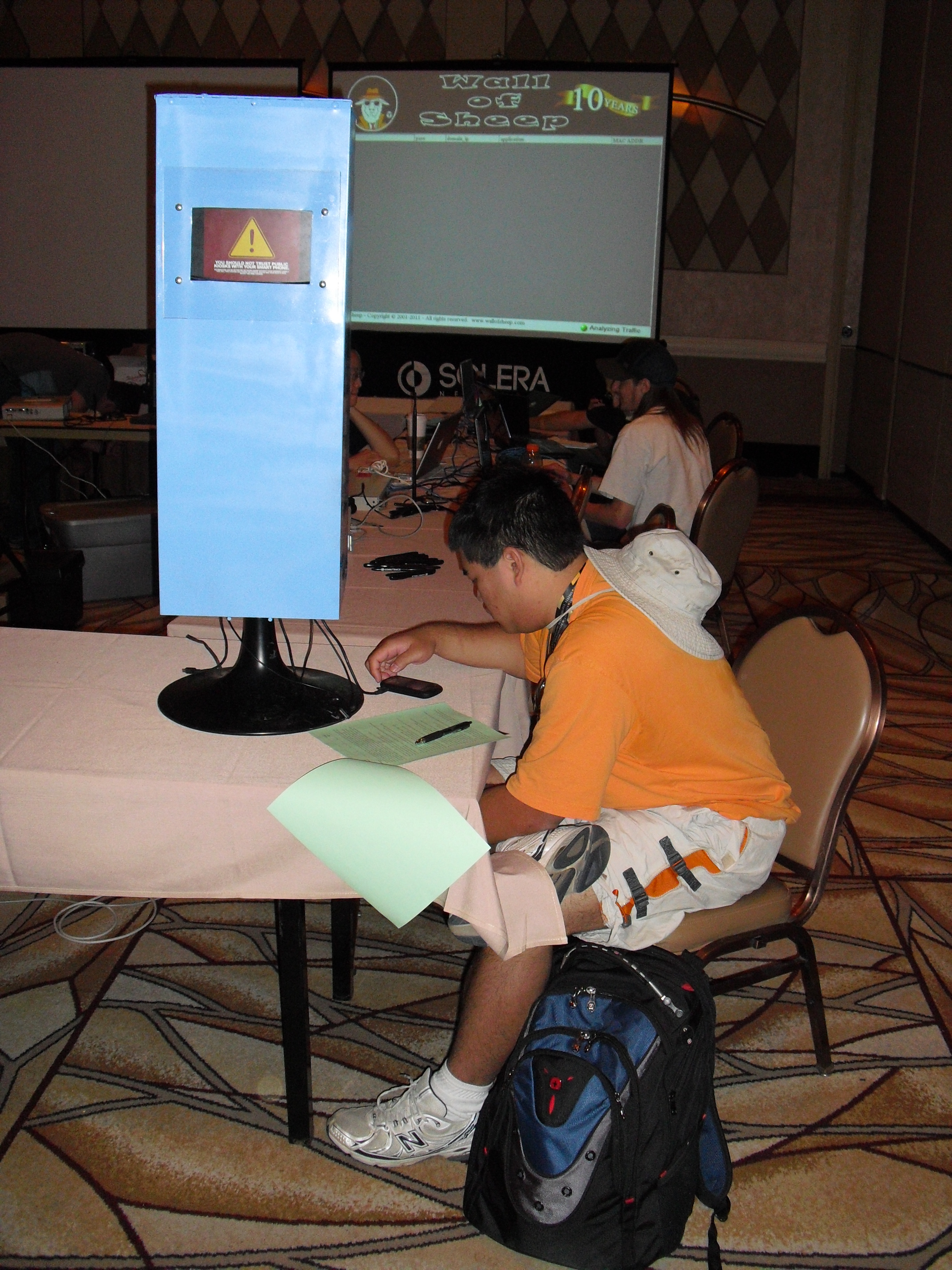
A DefCon attendee using the charging kiosk.
The answer, for most folks, is probably not. The few people I’ve asked while researching this story said they use these charging kiosks all the time (usually while on travel), but then said they’d think twice next time after I mentioned the possible security ramifications of doing so. Everyone I asked was a security professional.
Granted, a charging kiosk at an airport may be less suspect than, say, a slightly sketchy-looking tower of power stationed at DefCon, a massive hacker conference held each year in Las Vegas. At a conference where attendees are warned to stay off the wireless networks and avoid using the local ATMs, one might expect that security experts and enthusiasts would avoid using random power stations.
But some people will brave nearly any risk to power up their mobiles. In the three and a half days of this year’s DefCon, at least 360 attendees plugged their smartphones into the charging kiosk built by the same guys who run the infamous Wall of Sheep, a public shaming exercise at DefCon aimed at educating people about the dangers of sending email and other online communications over open wireless networks.

Brian Markus, president of Aires Security, said he and fellow researchers Joseph Mlodzianowski and Robert Rowley built the charging kiosk to educate attendees about the potential perils of juicing up at random power stations. Markus explains the motivation behind the experiment:
“We’d been talking about how dangerous these charging stations could be. Most smartphones are configured to just connect and dump off data,” Markus said. “Anyone who had an inclination to could put a system inside of one of these kiosks that when someone connects their phone can suck down all of the photos and data, or write malware to the device.”

To make their charging station more attractive to passersby, Markus and his pals equipped it with a variety of charging cables to fit the most popular wireless devices. When no device was connected, the LCD screen fitted into the charging station displayed a blue image with the words “Free Cell Phone Charging Kiosk.” The screen switched to a red warning sign when users plugged in any devices. The warning message read:
“You should not trust public kiosks with your smart phone. Information can be retrieved or downloaded without your consent. Luckily for you, this station has taken the ethical route and your data is safe. Enjoy the free charge!”
Markus said the comments from those who chose to juice up their phones at the kiosk were the most rewarding part of the project.
“One guy that clearly seemed stressed and in a hurry to get his phone topped off said, ‘I don’t care, take my data, I need my phone charged to make a phone call!’” Others said they planned to wipe their phones after leaving the hacker conference anyway.
“One attendee claimed his phone had USB transfer off and he would be fine.  When he plugged in, it instantly went into USB transfer mode,” Markus recalls.  “He then sheepishly said,  ‘Guess that setting doesn’t work.’”
Another DefCon attendee remarked, “This freaked my boss out so much he sent an email across the entire company stating employees are now required to bring power cables and/or extra batteries on travel, and no longer allowed to use charging kiosks for smart devices in open public areas.”
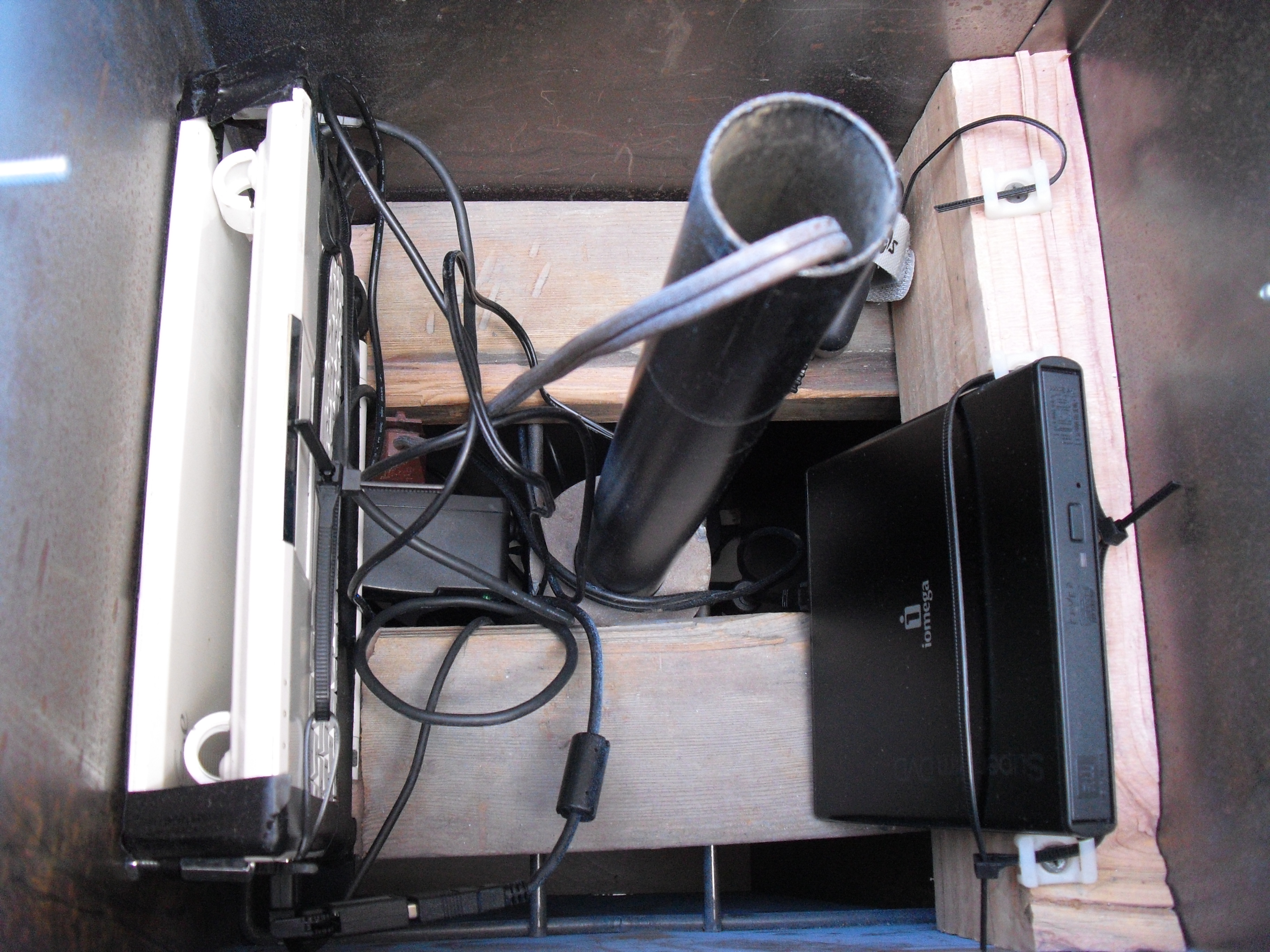
Inside the charging kiosk.
The safest route for charging your device on-the-go is to use the supplied power cord that plugs into a regular electrical outlet (assuming you can find an available outlet). Battery-powered mobile charging devices also work well in a pinch and are available at many airports. If you must use a random charging kiosk, the safest option may be to completely power off the device before plugging it in.
“One thing we discovered: On certain devices, if you power them completely off, then charge them, they don’t expose the data,” Markus said.

Thursday, October 18, 2012

Simple steps to Create Your own web page and publish it.

couple of my friends have asked for guidance on  how to create own web pge. here is one link, i hope would be useful.


http://websitesetupguide.com/

Tuesday, October 16, 2012

Word Press Accounts Hacked For Making Money

wordpress
Wordpress Security Team is sending out warning messages to thousands of wordpress users that their account has been compromised recently. Warning message include "We recently detected suspicious activity on your WordPress.com account. To protect your identity and keep your site safe, we’ve reset your password."

Message continue "To reset your password and get access to your account and blog, please visit WordPress.com. Click on “Forgot password?” in the Login toolbar to get started. It is very important that your password be unique because using the same password across different web applications increases the risk of your account being hacked."


Few hours ago I got mail from one of the 'The Hacker News' Reader that his wordpress blog (https://h4ck3r4life.wordpress.com/) has been compromised and he got same wordpress warning via email .When he login to his account, he saw that - Hacker post an article, title - "Im getting paid!" with an Image as article body shown below. Image hyperlink it to a survey site - http://surveyryphic.com/?=38823. This was a *.wordpress.com free blog.
spampost


On further search I found that, its not only his blog that has been compromised but also there are other 15000 more Wordpress users who have seen this spam article i.e "Im getting paid!" on their blogs. I just use google to find out the number of compromised blog, using dork -- site:wordpress.com "Im getting paid!" , and we got around a list of 15000 and more blogs that have same article with same image and Referal link to fake survey site.
wordpress-hack-google-search

I have also mark the day of post in above screenshot, its "1 DAY AGO" from writing of this article by me. Next, if we go to survey site, there is a signup page, if you want to become rich :P (obviously a greedy strategy to attract visitors).
hacked

But I ignore and sign up using my own email and website moved to another domainhttp://directredirection.be/thankyou3.html. Just after signup I got a mail from spammers that - "You're invited to participate." with option to click on "Claim My Spot", and I found Cybercriminals are using Bulk email campaign service form Getresponse.com, which is one of the biggest Email Marketing service. I contact Getresponse response team and still waiting for their reply about help to track down hackers.

Okay back, after clicking "Claim my Spot" from email I moved to another phishy site http://ecash0pinions.com/main.php?hop=ryph1, who are offering lots of Earn Extra Income From Home. There greedy strategy tagline is "Earn money by uploading videos".

So, in whole process this referral spam, that started from hacking of 15000 Wordpress blogs, we got three suspicious domains:
1.) http://surveyryphic.com
2.) http://directredirection.be
3.) http://ecash0pinions.com

After gathering more information, we found that :
1.) First to domains are Hosted same IP i.e 91.217.178.43 and 3rd one if on different 108.179.210.36
2.) "Rick Thomas" is the person who run "ecash0pinions.com" website, having Personal email:rickthomasvendor@gmail.com and Skype username: rickthomas.vendor.
3.) Another marketing sites by Rick is extremewealthmechanism.com.
4.) Most of his domains are Hosted on Russian hosting services.

May be Rick is not involved in these hacks, but possibly someone else using his referral system service to generate lots of money by directing thousands sites and readers via his referral link to such marketing sites.


Sour ce: www.thehackersnews.com

IE Zero Day Triggers Malware automatically

New Internet Explorer zero-day, Can trigger malware automatically

New+Internet+Explorer+zero+day+can+trigger+malware+automatically
         The new zero day exploit has been discovered and being exploited in the wild. This can be used to load malicious application on victim machines running fully patched Windows XP SP3 along with the latest editions of the IE 7 and IE 8 browser and Adobe's Flash software.

Eric Romang was examining one of the servers used to launch attacks on vulnerable Java installations in past, and he says that he has found a new zero day exploit for Microsoft's Internet Explorer web browser. He said, "I can confirm, the zero-day season is really not over yet."

AlienVault Labs researcher Jaime Blasco reported that, "the gang behind the Java attacks in August and September may be moving on: with domains used in that attack located at new IP addresses and serving up the new and more potent attacks."

As shown in above image example, the file exploit.html creates the initial vector to exploit the vulnerability and loads the flash file Moh2010.swf, which is a flash file encrypted using DoSWF. The Flash file is in charge of doing the heap spray. Then it loads Protect.html.

There results also shows that this zero day attack is being used in attacks that install the Poison Ivy Trojan. Metasploit has released a working exploit for this Zero-day.
Source: www.thehackersnews.com

Sunday, October 14, 2012

Make Your Own Website using word press

Making a web page is not a rocket science. Anyone with a little-bit knowledge of computers and soft wares can easily make an excellent web page. Please check this excellent video.
 http://www.youtube.com/watch?feature=player_detailpage&v=ScsOlOJsLZ4#t=0s

Thursday, October 11, 2012

installing dhcp server:THANKS TO YOYO CLOUDS.COM

Installing and configuring DHCP Server on Windows 2008 R2


Introduction
Dynamic Host Configuration Protocol (DHCP) is a core infrastructure service on any network that provides IP addressing and DNS server information to PC clients and any other device. DHCP is used so that you do not have to statically assign IP addresses to every device on your network and manage the issues that static IP addressing can create. More and more, DHCP is being expanded to fit into new network services like the Windows Health Service and Network Access Protection (NAP).

However, before you can use it for more advanced services, you need to first install it and configure the basics. Let’s learn how to do that.

Installing Windows Server 2008 DHCP Server

Installing Windows Server 2008 DCHP Server is easy. DHCP Server is now a “role” of Windows Server 2008 – not a windows component as it was in the past. 
To do this, you will need a Windows Server 2008 system already installed and configured with a static IP address. You will need to know your network’s IP address range, the range of IP addresses you will want to hand out to your PC clients, your DNS server IP addresses, and your default gateway. Additionally, you will want to have a plan for all subnets involved, what scopes you will want to define, and what exclusions you will want to create.
IMP NOTE: DHCP Server will require you to already have a AD and a DNS in place. You can read the How-TO article on each by clicking on the links below:

To start the DHCP installation process, you can click Add Roles from the Initial Configuration Tasks window or from Server Manager >> Roles >> Add Roles. 
When the Add Roles Wizard comes up, you can click Next on that screen.
Next, select that you want to add the DHCP Server Role, and click Next.

Review the DHCP Serer requirements and click Next to proceed
NOTE: If you do not have a static IP address assigned on your server, you will get a warning that you should not install DHCP with a dynamic IP address.

At this point, you will begin being prompted for IP network information, scope information, and DNS information. If you only want to install DHCP server with no configured scopes or settings, you can just click Next through these questions and proceed with the installation.

On the other hand, you can optionally configure your DHCP Server during this part of the installation.

In my case, I chose to take this opportunity to configure some basic IP settings and configure my first DHCP Scope.

I was shown my network connection binding and asked to verify it, like this:
What the wizard is asking is, “what interface do you want to provide DHCP services on?” I took the default and clicked Next.

Next, I entered my Parent Domain, Primary DNS Server, and Alternate DNS Server (as you see below) and clicked Next.
 
I opted NOT to use WINS on my network and I clicked Next.

NOTE: The Windows Internet Name Service (WINS) enables machines to resolve NetBIOS names of hosts on remote networks. Machines configured as WINS clients register their names with the WINS server. WINS clients are also able to send name queries to a WINS server to resolve the names to IP addresses. 
Windows clients can send a broadcast to the local network to resolve NetBIOS names, but when hosts are located on remote networks (networks that are on different network segments or NetBIOS broadcast domains), the broadcasts for name resolutions fail. The only solution is a WINS server.
Then, I was promoted to configure a DHCP scope for the new DHCP Server. I have opted to configure an IP address range of 10.5.100.20-50 to cover the 20+ PC Clients on my local network. To do this, I clicked Add to add a new scope.
As you see below, I named the Scope cloudLab, configured the starting and ending IP addresses of 10.5.100.20-10.5.100.50, subnet mask of 255.255.255.0, default gateway of 10.5.100.1, type of subnet (wired), and activated the scope.
Back in the Add Scope screen, I clicked Next to add the new scope (once the DHCP Server is installed).
I chose to Disable DHCPv6 stateless mode for this server and clicked Next.
You maybe prompted to authorize your  DHCP Server if you have an Active Directory installed on your system as well. In that case, provide your DOMAIN Administrator username and password as shown. Click Next once done
Then, I confirmed my DHCP Installation Selections (on the screen below) and clicked Install
The Role will take about 1/2 minute to install [Can vary depending on your Server's configuration]
Once installed, you will see the Installation Results. Click Close when done.
Like the installation, managing Windows Server 2008 DHCP Server is also easy. Back in my Windows Server 2008 Server Manager, under Roles, I clicked on the new DHCP Server entry.
In this article, you learned how to install and configure DHCP Server in Windows Server 2008. During that process, you learned what DHCP Server is, how it can help you, how to install it, how to manage the server, and how to configure DHCP server specific settings like DHCP Server scopes. 

firefox 16 vulnerablity forces its withdrawl within hours

Security Vulnerability in Firefox 16


Issue:
Mozilla is aware of a security vulnerability in the current release version of Firefox (version 16). We are actively working on a fix and plan to ship updates tomorrow. Firefox version 15 is unaffected.

Impact:
The vulnerability could allow a malicious site to potentially determine which websites users have visited and have access to the URL or URL parameters.  At this time we have no indication that this vulnerability is currently being exploited in the wild.
Status:
Firefox 16 has been temporarily removed from the current installer page and users will automatically be upgraded to the new version as soon as it becomes available.  As a precaution, users can downgrade to version 15.0.1 by following these instructions [http://www.mozilla.org/firefox/new/].  Alternatively, users can wait until our patches are issued and automatically applied to address the vulnerability.

Michael Coates
Director of Security Assurance
https://blog.mozilla.org/security/2012/10/10/security-vulnerability-in-firefox-16/

Wednesday, October 10, 2012

Cisco said to cut ties with China's ZTE

Follows investigation into sales to Iran

By , Network World
October 08, 2012 12:24 PM ET
Cisco has reportedly cut ties with Chinese telecom vendor ZTE after allegations that ZTE sold Cisco gear to Iran.
In June, a Reuters story revealed that Cisco, HP and Oracle gear was being sold to an Iranian mobile operator despite U.S. government sanction on such sales. Cisco conducted an internal investigation into ZTE's practices and as a result, recently ended a longstanding relationship with the Chinese company, according to a Reuters story published this week.

The Cisco/ZTE situation comes amid a report due today from the U.S. House Intelligence Committee that states that equipment from ZTE and fellow Chinese telecom company Huawei pose a security threat to the U.S. The report, which follows a year-long investigation, recommends the U.S. block any attempts by ZTE and Huawei to make acquisitions or mergers in America, and encourages U.S. firms to procure equipment from other sources.

A ZTE spokesperson said of the Cisco action that the company is "highly concerned" and "communicating" with Cisco, according to Reuters. The spokesperson also said ZTE is cooperating with the U.S. government on its investigation into sales to Iran. Cisco did not comment by the time this story was posted. But in June, Cisco said it "... complies with all U.S. export laws and requires our business partners to expressly acknowledge that they too must abide by these laws. Products such as these, which are not subject to individual export licenses, can be purchased from distributors and resold without Cisco's knowledge or control. We continue to investigate this matter, as any violation of U.S. export controls is a very serious matter."
According to this week's Reuters story, ZTE's general counsel at its Texas-based subsidiary alleged that the parent company plotted a cover-up of the sale of Cisco gear to Iran, including possibly shredding documents. The FBI has launched a criminal probe into the allegations, the news service reports.
ZTE has continued to do business in Iran while American-made technology has been subject to U.S. sanctions. A parts list dated July 2011 for an equipment contract between ZTE and an Iranian telecommunications company included several Cisco switches, Reuters reports. ZTE later agreed to sell five Cisco switches to another Iranian firm, according to the news service.
Cisco and ZTE partnered for the past seven years. Cisco viewed ZTE as a means to combat Huawei, which had been beating out Cisco in emerging markets by offering significantly cheaper products, according to Reuters.
But ZTE wanted to expand into the U.S. and Cisco did not want that, according to the Reuters report, which quoted "a former Cisco executive with knowledge of the matter."


http://www.networkworld.com/news/2012/100812-cisco-zte-263143.html?t51hb

Monday, October 8, 2012

Fake-bad-piggies-game-hijack-google
icon18_wrench_allbkg

Fake Bad Piggies Game hijack Google Chrome browser


Fake+Bad+Piggies+Game+hijack+Google+Chrome+browserRovio's latest game, Bad Piggies, is now available via Google Play and the App Store, and as a PC and Mac download, but it has not yet made its way to the Chrome Web Store. These pigs can indeed fly - "Bad Piggies," the spinoff to the monster hit game "Angry Birds," set a new record by soaring to the top of the charts just three hours after release.

Scammers have quickly taken advantage of this, introducing bogus versions of Bad Piggies into the Chrome Web Store that exist primarily to serve up in-browser advertisements thanks to a few plug-in permissions. 

Barracuda Networks’ lab today discovered a knock-off of the new and wildly popular “Bad Piggies” game which includes a phishing plug-in that may have injected an aggressive adware program into more than 82,000 Chrome browsers.

The lack of a free online version for Bad Piggies left space for others to capitalize on the instant success of the game. Just days after the game launched, Jason Ding, a research scientist from Barracuda Networks, found seven free versions of the games in the Google Chrome web store.

Jason Ding notes that all of these games are being distributed by the same site: playook.info. After installation, the games insert their own advertisements into popular websites. Barracuda found that after deploying the games in a test environment, they inserted advertising from playook.com into sites like Myspace, eBay, IMDB, Yahoo and MSN among dozens of other sites on the Chrome browser.
malware_app

"If you have already installed, uninstall them immediately and change your passwords on other websites if possible," Barracuda said. The firm also warned users to be wary of plugins that requires a lot of suspicious permissions.

Sunday, October 7, 2012

really good one

Date: Tuesday, 2 October, 2012, 12:52 PM


Don't scroll past the animals until you have  decided upon your answer.
 
The Banana Test

There is a very, very tall coconut tree and there are four animals..., 
A Lion , A Chimp    A Giraffe ,


...AND... 
A Squirrel 
  
  
They decide to compete to see who is the fastest to 
get a banana off the tree. 
  
Who do you guess will win? 
  
Your answer will reflect your personality. 
So think carefully . . . 
  
Try and answer within 30 seconds. 
Got your answer? 


Now scroll down to see the analysis.: 


If your answer is: 
Lion = you're dull. 
Chimpanzee = you're dense. 
Giraffe = you're a complete moron. 
Squirrel = you're hopeless. 

A COCONUT TREE DOESN'T HAVE BANANAS. 
Obviously you're stressed and overworked. 
You should take some time off and relax 
Have two glasses of wine. 
A full box of Chocolates. 
And a nice lunch. 
Now hurry up and forward it to someone else. 
They may need those glasses of wine.

Proud Blogger

Powered By Blogger